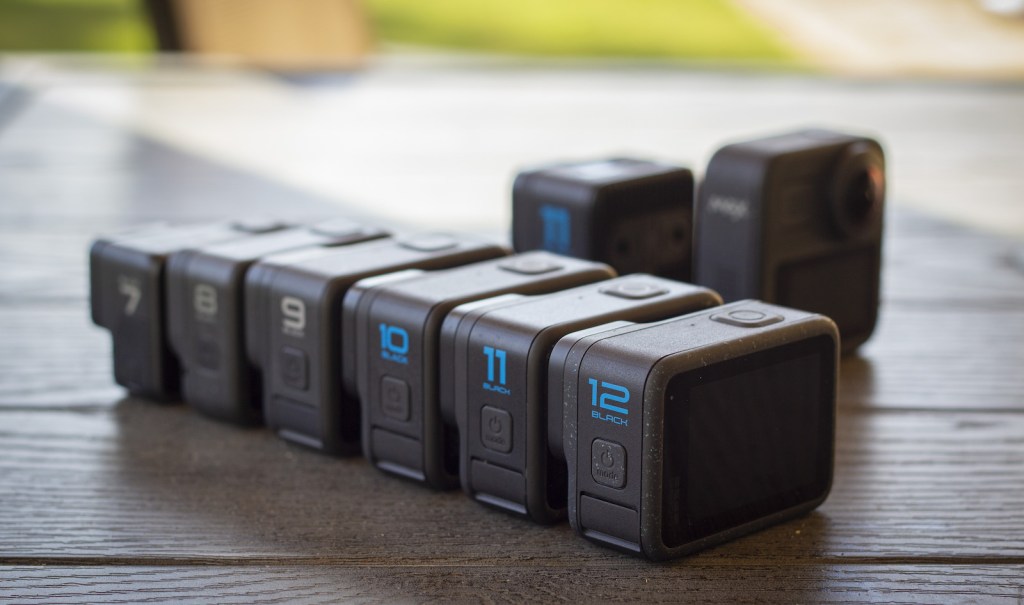
Breakdown from HERO7 to HERO13, which model is right for you?
When you purchase through links on our site, we may earn an affiliate commission at no extra cost to you. This helps us continue to create guides like this for our audience.
- Introduction
- What all GoPro models have in common
- HERO 7
- HERO 8
- HERO 9
- HERO 10
- HERO 11
- HERO 11 Mini
- HERO 12
- HERO 13
- Max
- Summary
If you’re looking for the best accessories for your GoPro, make sure to read The Ultimate GoPro Accessory Guide – Part 1: Mounts
Introduction
Ever since buying the HERO2 back in 2012, I’ve been a big fan of GoPro cameras. I must have shot hundreds of hours of footage on GoPros, first capturing action sports and later finding ways to incorporate them into commercial video productions. Much like new iPhone models, GoPro has adopted the “new model once a year” product cycle. This means they release a new camera often, but not every release provides significant improvements.
I usually want the best bang for my buck and I refuse to upgrade my gear unless I feel like it’s actually worth it. Through my job in video production, I usually get to shoot on all the latest cameras without investing any of my own money in the equipment, but with my personal gear, I like to stick to the same cameras for years before upgrading to a newer model.
With the release of every new model, I always see people wondering if it’s worth upgrading, what has actually improved and what things are just marketing hype. And of course with so many different models available, many users feel lost trying to decide what camera best fits their needs.
This is my guide to help you with that – to help you determine the differences between each model, how much each model costs right now, and which GoPro model is the best value for your individual needs. This guide focuses purely on GoPro cameras. There are other great action cameras available, but I haven’t used them enough to be able to objectively review them.
If you’re looking for the best deal, HERO11 and HERO12 right now provide the best experience for the least amount of money. Prices change over time as previous models get older so make sure to always compare your options before buying.
HERO11 – Check price on Amazon
HERO12 – Check price on Amazon
It’s a GoPro. Here’s what they all have in common.
Before getting into the specifics of each model, let’s get the obvious out of the way. It’s a GoPro. It’s the OG action camera, it’s waterproof, it can take a beating and you can mount it in places where most other cameras can’t go. People often get hung up on image quality and go down the rabbit hole about sensors, field of view, and other nitty-gritty details. The fact is, they all have incredible image quality for such a small camera. If you don’t believe me watch the HERO6 launch video.
If this is the quality HERO6 is capable of, then you shouldn’t really need to worry about image quality with any modern GoPro. They’re capable of amazing image quality, whether it’s an older model or the latest flagship camera. You can capture sharp, cinematic high-quality footage on any GoPro. A common complaint I see from users is that their footage looks nothing like the marketing videos, but this is a universal issue not limited to GoPro cameras. Your camera is a tool, and getting that beautiful cinematic footage comes down to you as the filmer knowing how to use that tool. If someone gives you a high-end cinema camera I can guarantee your footage will look bad compared to a Hollywood blockbuster film, unless you understand the camera and how to use it.
All cameras have their limitations – so does GoPro. They’re optimized for small size and weight, being waterproof, and capturing the best possible image quality. The downside? Battery life is short compared to larger cameras. Low light performance is poor. If used stationary with no airflow, overheating is common. It is an action camera and really crushes it when shooting all kinds of action – but if you’re using it for a long interview or as a dashcam, you might encouter issues.
Let’s talk about battery life for example. You’re using a 4K video camera that’s not much bigger than your AirPods case. Spoiler alert – one battery will not last all day if you’re constantly shooting. The actual battery life depends on the settings you’re using – higher resolutions and frame rates drain the battery faster – but as a rule of thumb you can expect one battery to last maybe an hour and all-day type of shooting will require spare batteries. You can’t compare it to your old DSLR when the size of the battery is as large as your entire GoPro.
Another hot topic is overheating, and I always say this has been blown out of proportion. Somewhere along the line when they increased resolutions and frame rates GoPros started to overheat, a lot. Or that’s what the internet will tell you if you do a Google search on the topic. I don’t know if everyone besides myself is shooting feature films or long-form documentaries out there on their GoPros but personally, I’ve never managed to get any of my GoPros to overheat in real-life use. The only time I got it to overheat was when I specifically tried to make it overheat, placed it on my desk, and left the camera stationary recording 4K video for around 30 minutes.
In real-life use, none of my GoPros have overheated. The only reliability issue I’ve had is the occasional hangups and freezing, which are super annoying when you’re trying to capture something important. I can’t say one model freezes more than another, but I will say back in HERO4 days the cameras would work perfectly 100% of the time and never glitch out. I really wish that type of stability would make a comeback.
Before we dive into different camera models and their unique features it’s also worth mentioning that every new GoPro model comes with a lot of small changes on the user interface that you’ll never hear about in reviews. Most reviews will focus on technical specs and performance but the user experience, convenience of using the camera, navigating menus and switching between settings doesn’t get talked about. Personally I think these things are huge and affect how often I pick up my GoPro over another camera. The changes are subtle so they go easily unnoticed but if you shoot on HERO11 and then jump back to HERO7 you’ll be shocked how clunky the old user interface feels. This is something that consistently improves with every model and doesn’t get enough credit. So when you’re choosing which model to go with, keep in mind that newer models will have a better user experience and easier menus.
HERO7 Black – The one that introduced HyperSmooth
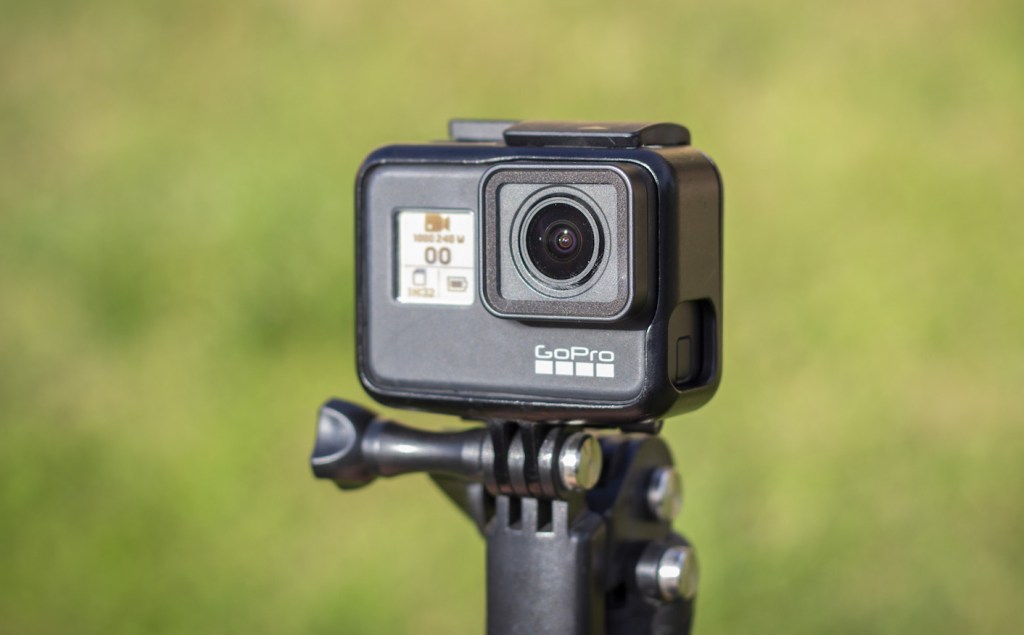
The HERO7 Black introduced HyperSmooth stabilization and pretty much changed the action camera game forever. HyperSmooth is the reason I would not consider any cameras older than the HERO7 even if you’re shopping second-hand models on a budget. It’s hard to explain without seeing it for yourself, but HyperSmooth stabilization really takes your footage to the next level and makes all the old shaky footage look really really bad. I would argue that the introduction of HyperSmooth is one of the biggest leaps in camera technology in the last 20 years. Just like the introduction of HD video or 4K, it instantly gave users a massive boost in image quality and almost completely eliminated the need for additional stabilizers like gimbals.
HERO7 shares the same form factor as HERO5 and HERO6, which means you can use the same batteries and accessories from older cameras. Most GoPro mounts are compatible with any camera but some accessories like the dive housing, floaty and ND filters are designed separately for each form factor.
The biggest difference between HERO7 and all the newer cameras is the way the camera is mounted. HERO7 and earlier cameras use a separate plastic frame around the camera to attach to mounts. HERO8 and newer cameras have built-in folding mounting fingers on the bottom of the camera. As good as HERO7 is, after getting used to life without the plastic frame I could never go back. It doesn’t seem like a big deal but not having to crack open the frame every time you need to swap a battery or pull an SD card out makes a big difference.
Besides the slightly annoying frame, HERO7 is a great camera. It shoots 4K video, raw photos, and beautiful slow-motion. It’s waterproof without an external case and like previously mentioned, it has HyperSmooth stabilization. HERO7 is also the last GoPro that’s compatible with the GoPro Karma drone and GoPro Karma stabilizer grip.
HERO7 Black – Who is it good for?
- People who want a decent GoPro for the least amount of money
- Anyone still using the Karma drone & stabilizer
- Users who just want basic video with good stabilization but don’t care about anything fancy
- If you don’t mind dealing with the extra plastic frame that goes around your camera
- HERO7 is hard to find from retailers at this point, but it’s a solid choice when shopping for used cameras
HERO8 – New mounting system, smaller, lighter

HERO8 introduced a new form factor that’s not necessarily smaller but a little bit lighter and slightly flatter than HERO7. One key difference, and I feel like this doesn’t get enough credit, is the built-in mounting making a separate mounting frame a thing of the past. Now you can easily snap your camera to any mount without extra accessories and you can swap batteries and SD cards while the camera is mounted. The downside, and this is a big one, is the lens. All previous GoPros had always had an interchangeable lens cover, meaning if you crack your lens you can easily swap it out with a cheap replacement lens. HERO8 does not have this – its lens is built-in, so if you scratch or crack your lens, your whole camera is basically ruined.

On the video side, the biggest upgrade with HERO8 was having an updated HyperSmooth 2.0 stabilization. While HERO7 has HyperSmooth available on most video modes, HERO8 has HyperSmooth on all resolutions and frame rates. This is a big deal, because previously you would have to ask yourself if you want the best resolution and frame rate or if you prefer getting a smooth shot, now you can have both. HyperSmooth 2.0 is also better and smoother compared to the first version on HERO7.
Having a different form factor meant none of the old GoPro cases or ND/dive filters fit HERO8. It also means HERO8 doesn’t work with the GoPro Karma drone or the Karma grip. A new addition that came out with HERO8 is the Media Mod, Light Mod, and Display Mod. With these, you can expand your camera to connect to external mics, lights, and other accessories. Media Mod in itself was supposed to give you better audio but the microphone is far from good. If you want high-quality audio, it’s best to use the Media Mod with an external microphone.
Check GoPro HERO8 price on Amazon
HERO8 – Who is it good for?
- The users who want a cheap, small lightweight GoPro with a touchscreen
- People who never damage their lens
- You don’t care about higher resolutions or additional features
- HERO8 is the oldest camera that can be used as a webcam
HERO9 – Bigger, more displays, higher resolutions
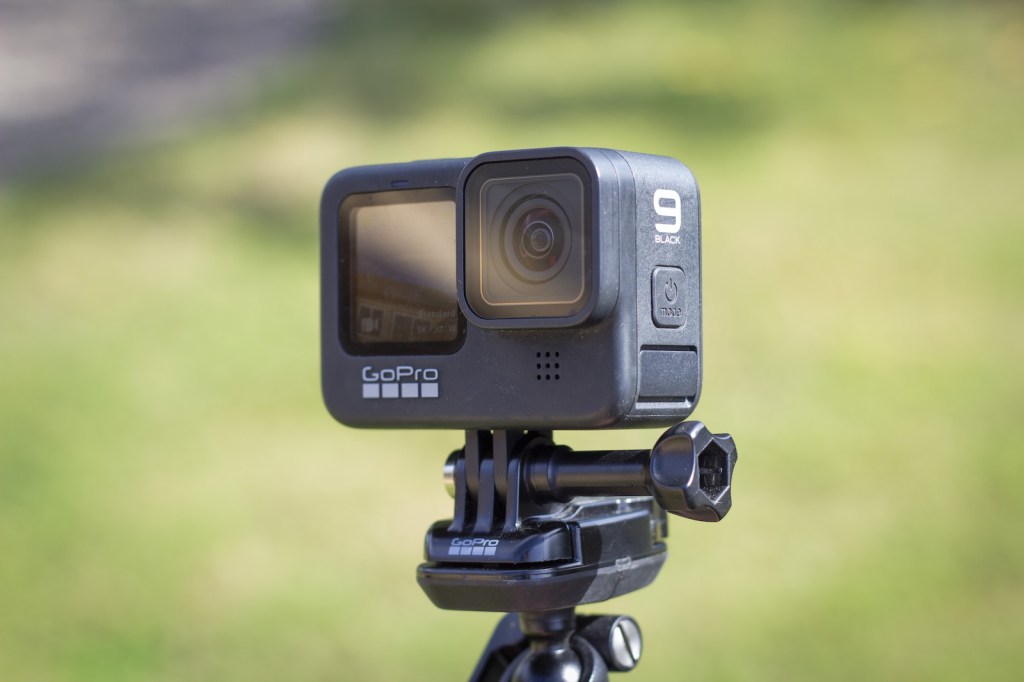
I wasn’t very impressed by the HERO9 at first. It once again had a new form factor, this time with a front LCD screen for all your selfie-filming (who cares?). It’s also quite a bit bigger than the HERO8. To be honest this all felt like a downgrade to me – until the first time I got my hands on this camera.
Surprisingly having the camera be a bit bigger felt like a good thing. The bigger display on the back was actually amazing, it’s easier to navigate the menus, your preview and playback on the camera look better and to my surprise, the front LCD was actually really nice to have. I didn’t think I would need a selfie screen, but suddenly snapping a family picture holding the camera got a lot easier when I could see the framing while shooting.
The new form factor also means new accessories and new batteries, which GoPro says have 30% more battery life compared to HERO8. Not sure if that’s accurate but the batteries are physically quite a bit bigger compared to the old ones. And thank god, the removable lens cover made a comeback with HERO9.
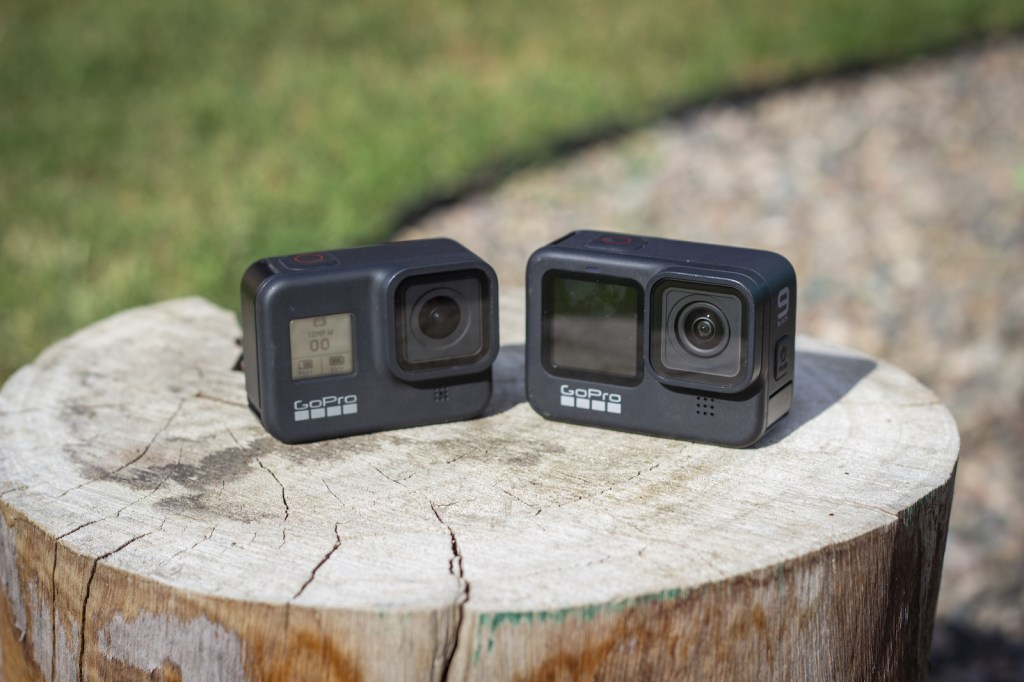
If the user experience is better with HERO9, so is the image quality. A lot of times new cameras will claim to have better video and photos but the difference is marginal compared to previous models. This is true with a lot of GoPro cameras as well. But when I first looked at photos shot on my HERO9, I could instantly see a significant improvement over the older models. The photos looked so much better it inspired me to use my GoPro for photography, not just for videos. The reason for such a drastic change is the new sensor – HERO8 has a 12MP sensor while HERO9 has a 23.6MP sensor. 20MP photos sounds like marketing hype, but it did make a big difference. And with the new sensor, you’ll also get 5K video.
With HERO9 GoPro also launched their first Max Lens Mod. This is a lens attachment for your camera that gets you a wider field of view and the name suggests you’ll get similar footage compared to their MAX 360 camera. Personally I never really liked the Max Lens Mod. It’s big and bulky and it doesn’t make your shot that much wider. One thing it does really well however is horizon lock – with Max Lens Mod you could rotate the camera around a full 360 degrees and your camera will keep the horizon level. But newer GoPro models do this without a lens mod, and using the Max Lens Mod on HERO9 will limit you to 2.7K resolution.
I’m not sure if it’s the new form factor of the HERO9 but this model had some pretty bad reliability issues. For a long time, the rear touchscreen was really, really unresponsive and hard to use. GoPro released a firmware update to address some of these issues and the touchscreen responsiveness improved, but I’ve still had issues from time to time. HERO9 was also the first GoPro that could shoot 5K footage which I think contributed to the amount of people complaining about overheating issues. I’ve never had this issue personally, but I usually don’t record continuously for 30+ minutes, or if I do my camera is usually involved in an activity where it gets plenty of airflow, meaning no overheating.
Other new features worth mentioning are the Enduro batteries that perform better in cold temperatures – you can only get Enduro batteries for HERO9 and newer models. HERO9 also introduced Power Tools, cool little options to for example schedule your camera to capture something at a specific time and date, or use “Hindsight”, a feature where the camera is constantly buffering and hitting the record button not only starts recording, but also saves the 30 seconds prior to you hitting record. These might be only useful for niche use-cases but I love to see innovation like this.
Check GoPro HERO9 price on Amazon
HERO9 – Who is it good for?
- For anyone who wants the best image quality for the least amount of money, HERO9 was the biggest upgrade in years
- Great for photography
- First GoPro to have Horizon Leveling with Max Lens Mod
- Selfie shooters
HERO10 – New processor, more responsive camera
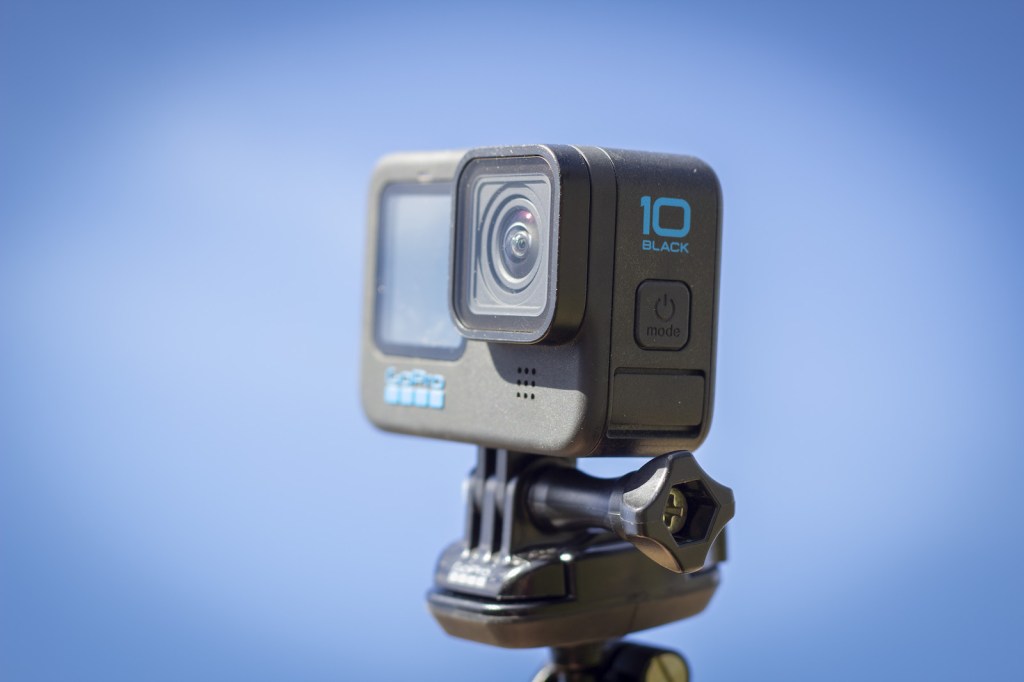
You’d think number 10 in the lineup would be a big upgrade but unfortunately, that’s not the case. HERO10 is very similar to HERO9. Same form factor, the same sensor, overall everything looks the same. This is basically a HERO9 but the grey GoPro logo is now blue.
Ok, to be fair there are a few key differences . HERO10 got a new GP2 processor and that’s actually the biggest upgrade here. The first time I picked up a HERO10 I could instantly feel how the touchscreen was more responsive. Changing settings and browsing the menus felt a lot faster and smoother which was a nice change after dealing with the unresponsive and freezing screen of HERO9.

Image quality doesn’t change much. You now get 23MP photos instead of 20MP but as you might guess, the difference isn’t noticeable. Video looks the same as well, the biggest difference being that now you could shoot 4K video at 120 frames per second. Very nice upgrade for those who want good slow motion at higher resolutions and honestly getting 4K120 at this price point is pretty awesome. HERO10 also bumps up the frame rate for 5K resolution to 60fps when the HERO9 is only capable of doing 5K video at 30fps. Using 5K instead of 4K is sort of debatable, but I know some people prefer the higher resolution for more flexibility in post-production.
Other than the new processor and 4K120 this is an underwhelming upgrade. Same mods, the same features, and no major updates on the software side. One software update worth mentioning is auto-upload to the cloud. Personally I don’t need this and you need to be a GoPro subscriber to use the feature. When enabled it will automatically upload your footage to the unlimited cloud storage that comes with a GoPro subscription. The upload only happens when the camera is plugged in, so the idea is that you capture your adventures during the day, come home, plug in the camera and later all your footage will be available in the cloud. Nice and convenient but I’m more of a “manage your content manually” -type of guy.
The other software change that I’ve never needed but might help some users is the new Video Performance Modes. With these you can change between “Maximum Video Performance”, “Extended Battery” or “Tripod/Stationary Video”. The goal here is to limit the camera functions to optimize the user experience (and camera performance) for a specific type of shooting. Maximum will give you the full horsepower. Extended battery does just that, eliminating some features in order to maximize your battery life. Tripod/stationary mode is maybe the most interesting out of the three. The overheating complaints are still going strong so this mode is supposed to help keep the camera cool by disabling features like HyperSmooth – GoPro’s stabilization is amazing but it’s also pretty taxing on the processor so turning it all off will help keep the camera cool when shooting on a tripod where you don’t need any stabilization.
Also, HERO10 got a nice little upgrade on its lens that doesn’t get talked about much. It now has a hydrophobic coating on the lens helping waterdrops to roll off the lens easier. Nice little upgrade compared to older cameras where waterdrops would get stuck on the lens and cover a big part of your shot. The hydrophobic lens doesn’t completely eliminate water on the lens and you might still see small drops of water in your shot if the camera gets wet, but overall I would call it a big improvement.
Check GoPro HERO10 price on Amazon
HERO10 – Who is it good for?
- If you can’t afford the newer models it’s a great camera
- Slow motion shooters – HERO10 is the cheapest GoPro that shoots 4K120
- Minor updates but the GP2 processor makes it better and more pleasing to use compared to HERO9 – mostly improving responsiveness and user experience, not so much image quality
- If you’re upgrading from HERO9 you might want to skip the 10 and go straight to 11 or 12
HERO11 – Same camera, now with a taller sensor

HERO11 continues on the same path as HERO10 – it looks the same, feels the same, and for the most part, also functions the same.
The biggest improvement with HERO11 is the taller sensor. While the previous models had a 4:3 sensor, HERO11 upgrades to a 8:7 sensor. Why does this matter? 8:7 is very close to a square shape, meaning you’re now capturing the same wide angle horizontally, but getting more space vertically on top and bottom of your frame. It’s a wider shot which is great for people shooting POV footage, or if you want to capture one shot and reframe it later. With this sensor you don’t really need to turn your camera sideways to shoot vertical video – you can capture one shot in an 8:7 aspect ratio and it will look good whether you resize to a 16:9 standard YouTube video or frame it to a 9:16 Instagram story. Some users don’t care, but it’s a big deal for all the social media people out there who work on videos that get resized to multiple aspect ratios to be used on different platforms. This new aspect ratio also made the Max Lens Mod pretty pointless because now you can get a really wide angle without additional accessories.
Besides the new sensor, there’s not much that has changed from HERO10. HERO11 does have 10-bit color which might be interesting for anyone who does a lot of color grading, but for the average user, it doesn’t mean much. It has HyperSmooth 5.0 and while it’s technically a little bit better compared to older cameras, most people won’t notice a difference compared to HERO 9 or 10.

Resolutions and frame rates are the same, the only difference being that 4K at 120fps is now available with the SuperView lens setting. For those that are not familiar, GoPro uses a fixed lens that doesn’t have any zoom functionality but the camera is programmed to have “digital lenses”, allowing you to change from narrow to wide to super wide, or what GoPro calls “SuperView”. With the addition of a taller sensor, GoPro also added a new lens profile called “HyperView”, which is even wider than what used to be the widest setting, SuperView. I have mixed feelings about HyperView, it’s kind of amazing how wide of a shot it can capture but the edges of your video definitely get pretty stretched and wonky so I usually avoid using it.
One new feature that ended up being potentially my favorite is the new night effects. HERO11 takes traditional timelapse/nightlapse shooting a step further with the built-in night effects and you can now choose between light painting, vehicle light trails and star trails. These are surprisingly fun to play with and I found myself shooting star trails just for fun because of how cool the end results look.
Like HERO10, HERO11 also comes with a hard case for storing your camera and accessories (or at least it used to, when writing this GoPro has removed the mention of the hard case from their website but when I bought mine, it arrived with a case). HERO11 also comes with the improved Enduro battery, something you don’t get with HERO10.
Check GoPro HERO11 price on Amazon
HERO11 – Who is it good for?
- Anyone wanting the best camera but not willing to pay for the flagship model
- Social Media Creators – Perfect for using the same shot for vertical + landscape video
- Artistic timelapse people who want to experiment with night effects
HERO11 Mini – The super simple one button camera

With the launch of HERO11 GoPro released another version of it, HERO11 Mini. This feels like a step towards their super small Session lineup that they had around HERO4 and HERO5 cameras, although while the Session was a tiny cube HERO11 Mini is quite a bit bigger. It’s still smaller than HERO11 but not small enough to be compared to the old Session cameras.

I know people that love the HERO11 Mini but it’s just not for me. It has all the same video resolutions and frame rates that HERO11 but it doesn’t have a touch screen or front LCD. The only screen is a tiny indicator screen on top of the camera. Operating the camera feels like HERO2 again with just two buttons. It also doesn’t shoot still photos at all (come on, really?) although it does have all the timelapse and night effects that HERO11 does. It also has a built-in battery meaning when your battery dies, you’re done for the day, swapping out a spare battery is not an option.
My biggest issue with HERO11 Mini is that it’s a highly unreliable camera. I’ve seen a number of people online complain how their cameras got bricked and stopped working, and mine has had its fair share of issues as well. It freezes and crashes a lot, and not having the option to pull out the battery to reset your camera is a nightmare to deal with.
Check HERO11 Mini price on Amazon
HERO11 Mini – Who is it good for?
- When you just want the smallest possible camera and don’t care about anything else
- No screens, no cracks – probably the most robust GoPro out there
- For the simple shooters who want to hit record and not worry about settings
- People who never shoot photos
- Users who want HERO11 video quality for a smaller price tag
HERO12 – A tiny bit better but mostly the same
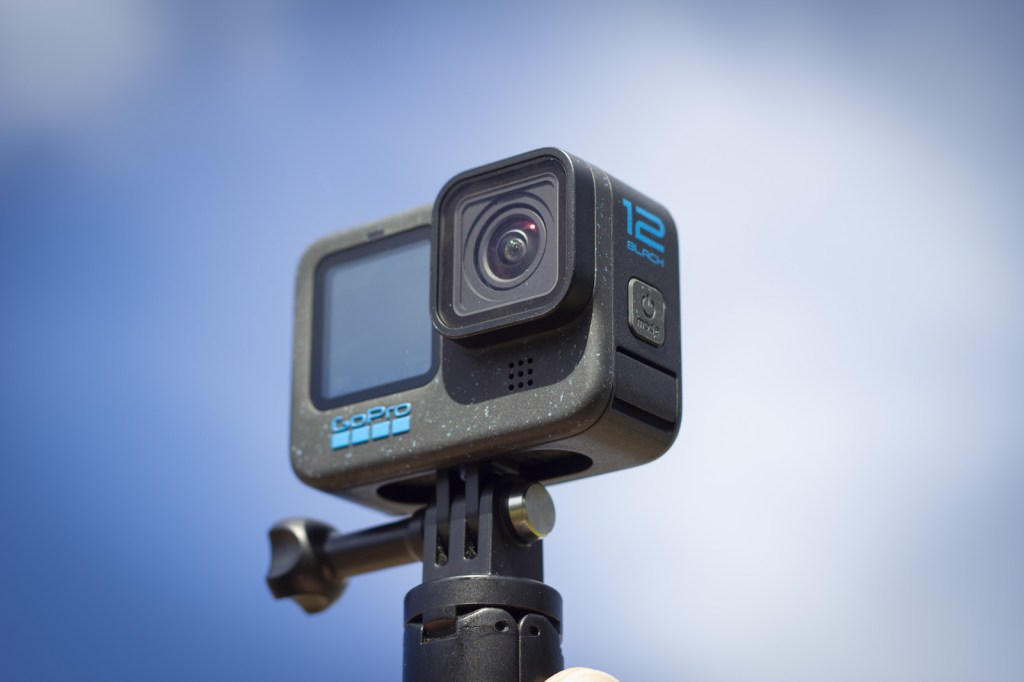
HERO12 is once again a minor update and received quite a bit of criticism for being a “firmware update” rather than an actual camera release. Besides some added blue speckles on the camera it looks the same as HERO10 and HERO11. According to my wife, it just looks dirty straight out of the box. Not the best first impression of a design update.
So what’s new? Before getting into the nitty gritty and new features, I want to talk about the UI. No one gives this credit but I feel like the UI has improved a lot since the HERO11. It’s all just small things, but the way you access your video settings, change your resolutions and frame rates, create presets, navigate menus… it all feels much better. Fine-tuning the menus feels like a small thing but for me, it’s the first thing that made me happy about my upgrade. I spend a lot of time tweaking my settings so any improvement here is huge.
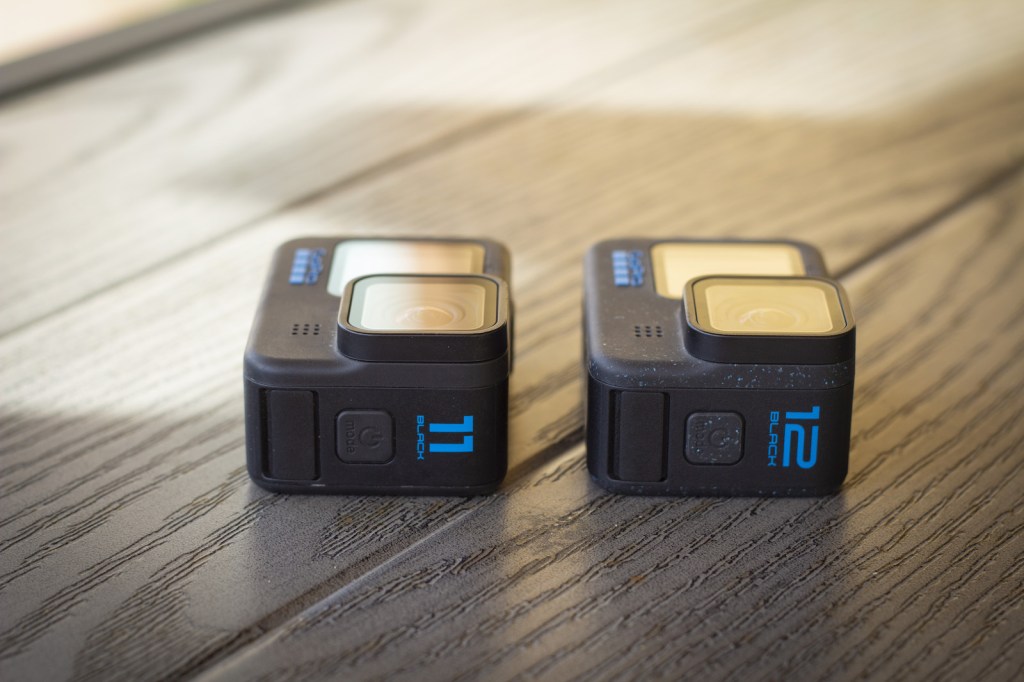
Now that we got that out of the way, let’s talk features. HERO12 has HDR video, improving your exposure in tough lighting. HDR stands for High Dynamic Range, it’s meant to capture footage that more accurately represents what the naked eye sees, improving exposure issues between deep shadows and bright highlights and giving you an overall more vivid and bright image. HDR as a term has gotten a little bit confusing by the way companies are using it, GoPro’s way of using HDR is basically tone-mapping your shot, improving exposure by balancing out shadows and highlights and encoding it all into a standard dynamic range file. There’s also a different kind of HDR, using a specific color profile, requiring an HDR-capable monitor for viewing your HDR footage, giving you a more vivid image with brighter highlights, darker blacks, better colors, and a nice rich contrast. HDR technology and the different definitions of it can be quite a rabbit hole so we’ll just leave it at that. We did a quick video demonstration using GoPro HERO12 vs. HERO11 showing how HDR on GoPro performs. Check out the video below.
HERO12 has improved battery life compared to HERO11. GoPro claims up to 2x longer runtimes. In my daily use I don’t really see a big difference, but I guess it performs slightly better. I usually shoot short clips here and there so one battery lasts me days and it’s hard to track how much use I get from each battery, but knowing battery life has been one of the weakest points of GoPros for years it’s nice to see improvements being done here.
Besides, HDR HERO12 has no major changes compared to older cameras, but it has a lot ofres. You can now connect wireless Bluetooth devices like AirPods to your GoPro for wireless sound recording and voice command. The new Max Lens Mod 2.0 takes full advantage of the 8:7 sensor, giving you a whopping 177-degree field of view. If that doesn’t sound like much, just think about a full 180 degrees squeezed into a video. It’s crazy wide. HyperSmooth is now at 6.0, and it feels like the only thing that’s changed is the number. It’s always been great and still is. New timecode sync allows you to sync multiple GoPros, which is nice for professional users capturing. The GP-Log color profile brings Log footage to GoPros, giving you a flat image for maximum control in post-production and color grading. Resolutions and frame rates are still the same; nothing new there. Some people talk about adding 8K video, but personally, I barely use 5K, so the need for 8K isn’t really there. I’m not ready to upgrade all my TVs and monitors to 8K, anyway. I would love to see higher frame rates for better slow motion, and this is something that they added with the HERO13.
One thing HERO12 does not have is GPS functionality. This is a weird one, every GoPro I can remember has always had GPS, allowing you to do GPS overlays on your footage showing speed, route maps, altitude etc. It’s a feature that I rarely use but when I do, it’s really fun. It’s hard to say why such a basic, long-term feature was suddenly dropped but I’m guessing it has something to do with chip shortage, maximizing battery life and trying to bring down the cost of components for the camera.
HERO12 also doesn’t come with that nice hard case anymore that I got with my 10 and 11. Times really are tough now.
I recently saw a funny highlight video of Apple’s product launches where they say “it’s the best iPhone we’ve ever made” every single year. It makes a funny highlight reel when cut together but it’s also kind of true, a lot of the tech companies have hit a little bit of a plateau with their products so annual product updates are pretty minor at this point. GoPro falls in this category as well. It’s clear that HERO12 is the best GoPro they’ve ever made but it doesn’t give you a huge upgrade if you already own a HERO10 or HERO11.
Check GoPro HERO12 price on Amazon
HERO12 – Who is it good for?
- For the users who want the widest possible shots (with Max Lens Mod 2.0)
- All-day shooters needing the best possible battery life
- For the ones who don’t need GPS
HERO13 – A big upgrade with lots of new cool accessories
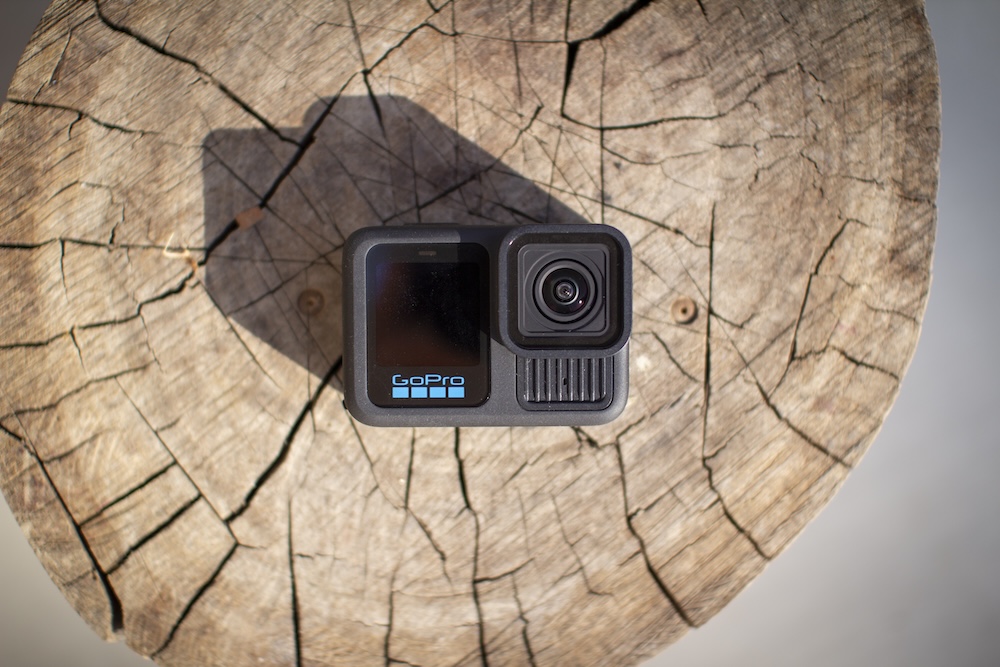
Unlike previous models that didn’t bring many new features, HERO13 is actually pretty loaded with new features and accessories. It’s compatible with GoPro’s new HB-Series lenses, which consist of anamorphic, macro and ultra-wide lenses, as well as a set of ND filters. Other notable upgrades are burst slow-motion at higher frame rates, magnetic mounting, a larger battery, the ability to charge your camera through a magnetic, waterproof cable, faster wireless transfers with WiFi 6, improved HLG HDR video, and bringing back GPS which was missing from HERO12. This feels like the first solid upgrade in years, where you’re guaranteed to get your money’s worth.
GoPro’s selling point for HERO13 is the new set of lenses, but I actually think it’s everything else that makes it a worthy upgrade. But since the lenses seem to be the main story for this camera, let’s talk about lenses for a second.
The HB Series of lenses have four different options, but it’s really two of the lenses that are truly new and two that we’ve already had with previous cameras. The ultra-wide lens was formerly known as Max Lens Mod, and it’s been available since the HERO9. ND filters have also been a standard accessory for many shooters, and while 3rd party manufacturers like PolarPro have dominated this category in the past, GoPro now offers their own set of ND filters. The lenses that are truly new are the anamorphic lens and the macro lens.
ND filters are great for certain types of shooting where motion blur is desired – usually photos and videos of scenes where you have fast movement combined with a subject that’s sharply in focus. Here’s Reddit user valadarc demonstrating the benefits of ND filters.

The ultra-wide lens gives you a wider field of view, but personally I’ve never been a big fan of it. For me, the standard GoPro lens is wide enough, and if I truly want to go crazy wide, I’ll use the MAX 360 camera instead.
The anamorphic lens is interesting, but at the time of writing this, it’s not yet available. Traditionally, anamorphic lenses are used on cinema cameras to capture a wider horizontal field of view, but on a GoPro camera, you’re already getting a really wide field of view straight out of the box without any additional lenses. It does give you cinematic footage with a wider 21:9 aspect ratio and black bars on the bottom and top of your frame, but overall, this seems like an unnecessary accessory for a GoPro camera. Another big reason why some people love anamorphic lenses is the horizontal lens flares when shooting against a light source, but looking at GoPro’s own videos, the lens flares look pretty dirty and cheap.
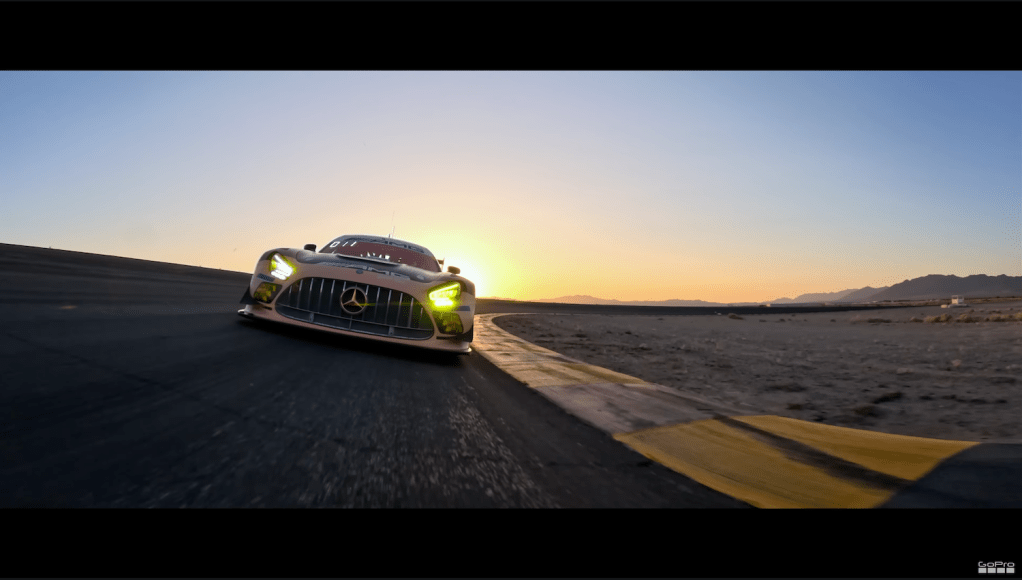
My favorite of these new HB Series lenses is the macro lens. It solves a problem every GoPro owner has struggled with at some point – you’ll bring something close to the camera, and anything closer than 12″ or 30cm just becomes a blurry mess. Now, you can get clean, crisp close-up images with the Macro lens. One thing to note is that the Macro lens is still as wide as your regular GoPro, so if you’re thinking of traditional macro photography -type of shots, you won’t get that. But having a macro-focus on a wide shot brings its own kind of cool and unique look to your shots. The best part is that they’ve included a focus ring on the lens, so you can really focus on close objects, or you can switch the focus to far away objects like you’d see on a regular GoPro footage. With this, you can shoot everything with one lens without having to constantly change it.

Personally, I’m most excited about everything else besides the lenses. Reintroducing GPS is great, and I love to see GoPro listening to their fan base. A lot of us were pretty upset when HERO12 did not have GPS functionality. The battery has been upgraded to a larger 1900mAh version, which is great, but also means that none of the previous GoPro batteries are compatible with HERO13. The dual battery charger has been upgraded to be taller, holding the batteries in place better compared to the old version. The new charger also has four LED lights to show you the battery charge level, compared to the old charger which would simply show either yellow or green, often being inaccurate.
As someone who shoots a lot of long timelapse videos, I absolutely love the new magnetic door + power cable kit. With this you can easily power your GoPro by using an external power bank, and the magnetic power cable keeps your camera sealed and waterproof. The magnetic door and power cable is compatible with previous cameras all the way to HERO9, so if you’re using an older GoPro to shoot for extended periods and need external power, this accessory is a must-have.
Contacto magnetic door and power cable – Check price on Amazon
Another magnetic feature of HERO13 is the magnetic mounting. GoPro’s old quick-release buckle system is great and very sturdy, but the magnetic mount makes it so much easier and faster to attach and detach your camera between different mounts. None of these are unfortunately included with the camera, so you’ll have to buy the accessories separately.
Magnetic Latch Mount – Check price on Amazon
Magnetic Latch Ball Joint Mount – Check price on Amazon
Video modes are mostly the same compared to HERO12, but HERO13 does have a new burst slow-motion feature, giving you 400 frames per second at 720p, but only for 15 seconds. You can also choose a higher 900p resolution at 360fps or go all the way up to 5.3K at 120fps, although at this resolution, the camera can only capture 5 seconds of footage at a time. I love the burst slowmo and I hope they keep adding features like this in the future – I’d love to get RAW video from my GoPro, even if it was a shorter burst at a time. And speaking of video modes, you can now FINALLY give your video presets a custom name, something many users have been asking for years.
Outside of everything I already mentioned, HERO13 is very identical to HERO12. It has the same 8:7 tall sensor, giving you the flexibility to crop your shot in post-production. It shoots 27MP photos, has the 1/4″ 20 mounting on the bottom, and the physical size is the same, meaning your old dive housings and media mods will work with HERO13. GoPro did add a small heatsink under the lens, which is supposed to help with overheating, and personally, I haven’t had any overheating issues in my personal use.
Overall, HERO13 is the biggest update I’ve seen in years from GoPro.
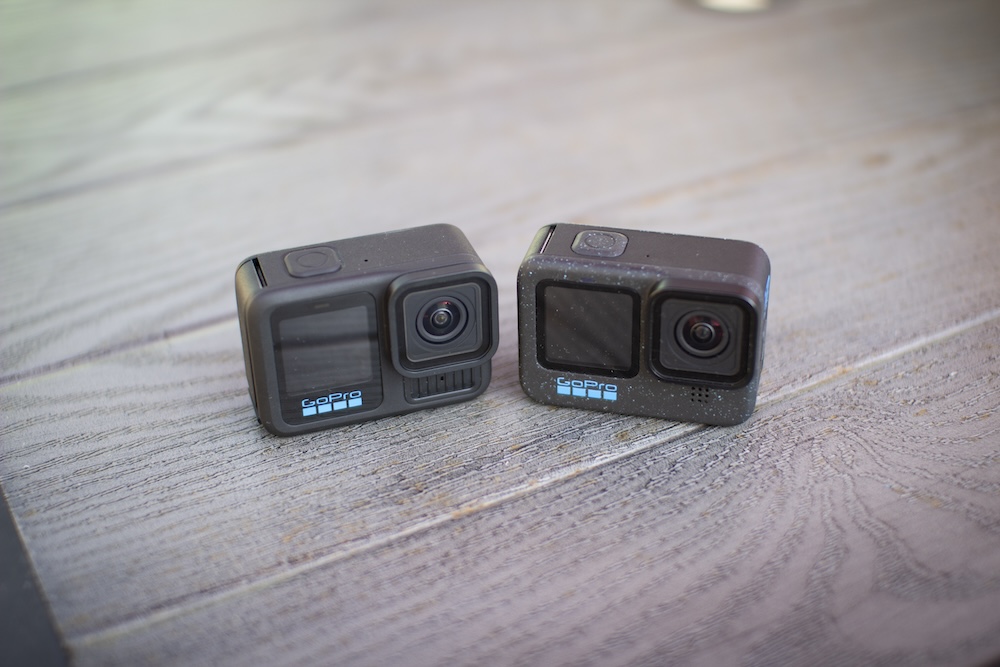
HERO13 – Who is it good for?
- Serious users who value accessories – lots of new accessories available
- For those who appreciate convenience – magnetic mounting
- Anyone shooting for expended periods – charging through magnetic waterproof cable
- Creatives – HB Series lenses give you a new look
- Anyone who wants legit HDR footage
- Slow-motion fans – burst slowmo is a great update
- Mobile app users – Wifi 6 is significantly faster
- GPS overlay users – HERO12 didn’t have it, HERO13 brings it back
GoPro HERO13 Black – Check price on Amazon
GoPro MAX – The old 360 workhorse that just keeps going
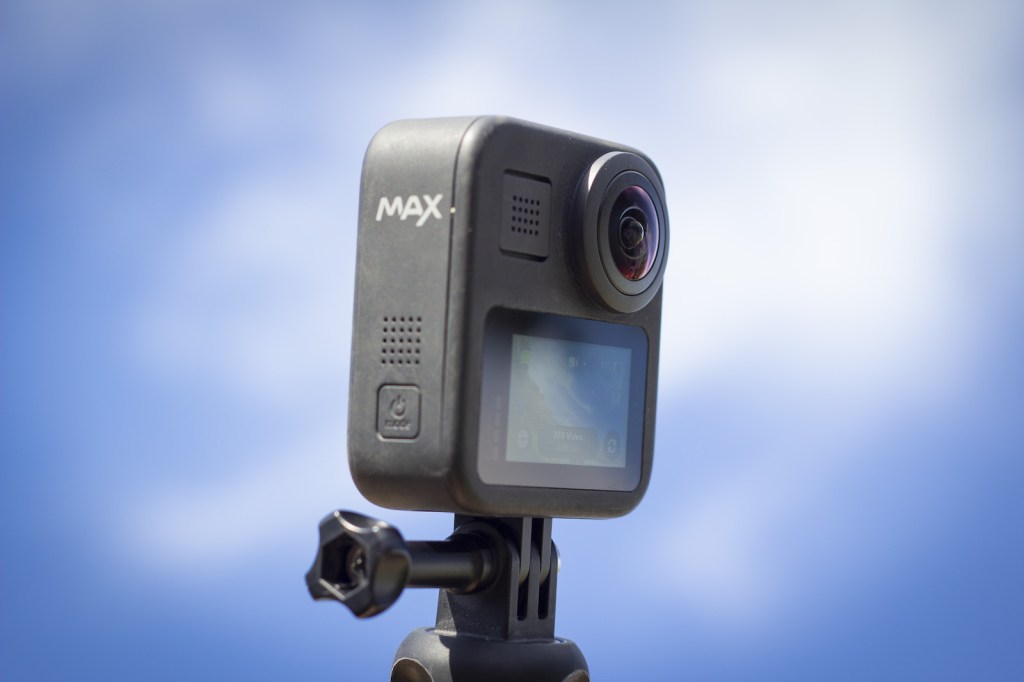
GoPro MAX came out in 2019 at the same time with the HERO8 but it’s basically its own product category so I think it’s fair to separate it from the rest of GoPro’s camera lineup.
MAX is an interesting product because it was first released four years ago and it still remains in GoPro’s lineup as their only 360 camera. GoPro has just recently confirmed MAX 2 is in the works so we should see an update in the 360 lineup soon, but they haven’t confirmed an official release date yet.
Despite being old MAX might just be my favorite GoPro camera. I do a lot of shooting on regular GoPros and whenever I’m capturing family stuff, photos or timelapses I always grab a regular GoPro. But whenever I’m doing sports I almost always shoot on MAX. If you’re not familiar with 360 cameras, they capture a full 360 sphere all around the camera and you can later use the footage to either make a 360 VR video, or you can do what seems to be the more popular option these days and use the 360 footage to reframe it into regular video. The benefit of using 360 footage for a regular video is that you can frame your shot later when editing the video, you get a wider shot compared to any normal camera, you can do the invisible selfie stick shot and you can turn the camera around during your shot to show multiple angles. And then there’s the tiny planet effect and all other trippy stuff that’s very easy to do with 360 cameras. It really gives endless flexibility for the editor to get creative.
MAX has the same robust stabilization as other GoPros, it shoots 6K video, still-photos, timelapse video and it’s waterproof. 360 cameras don’t really produce good video underwater because of the way focal lengths change underwater so don’t expect to capture your diving adventures in 360. But it’s nice not to worry about getting the camera wet if you’re skiing in slushy conditions or surfing.
Some 360 cameras record two separate files, one for each lens, which you then have to stitch together later. MAX is great because it stitches footage in-camera so each recording results in just one file, which is a huge benefit (ask anyone who has spent time stitching footage from the old GoPro Fusion camera). That being said, working with 360 footage is still more complicated compared to regular GoPros. It’s easy when you learn the workflow, but requires a few extra steps with every video clip so it’s not necessarily for everyone. Another thing to look out for is the lenses. MAX, like all 360 cameras has curved lenses that stick out of the camera. These lenses unfortunately are not interchangeable so if you scratch the lens your camera is pretty much ruined. I’ve seen people buy a MAX and scratch the lenses within a few days. Trust me, you’ll want to protect those lenses.
If you want to shoot 360, MAX is a great camera. Just keep in mind that it doesn’t exactly replace a regular GoPro. Different use case, different camera. It can’t compete with the high resolution 4K and 5K footage from newer GoPros (when reframing 6K MAX footage the final output is about 1080p) and it also doesn’t shoot very good slow-motion. But for 360 work it’s still great.
Check GoPro MAX price on Amazon
GoPro MAX – Who is it good for?
- Creatives who want to push the boundaries and utilize 360 technology
- POV and action sports shooters
- Users who don’t mind learning a new workflow and spending more time when it comes to editing
- The careful ones who never scratch their lenses
Summary – Which GoPro is the best for me?
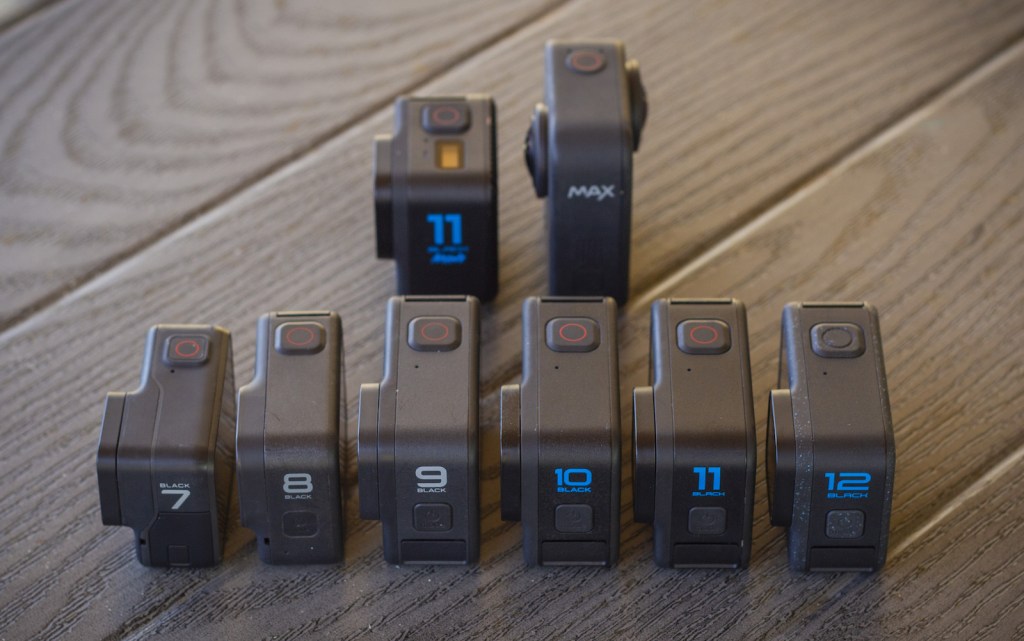
What the best GoPro is for you depends on where you’re coming from. If you’re currently shooting on a HERO4 or have never owned a GoPro, then any camera listed here will be a huge upgrade and you’re going to have fun shooting with it. If you own a HERO8 or HERO9, you’ve already gotten used to the main features of a modern GoPro camera and the improvement you’ll get with newer models won’t be as drastic. It all comes down to your budget too. If you can dish out the price for the flagship model then I recommend doing that, you’ll get a top-of-the-line camera that will still be awesome years from now. If you’re shopping on a budget it’s worth looking into HERO11 or HERO10, both are awesome cameras and now a little bit cheaper so they make for a great entry-level camera for those that don’t necessarily need all the latest features.
 Quick Tutorials
Leave a comment