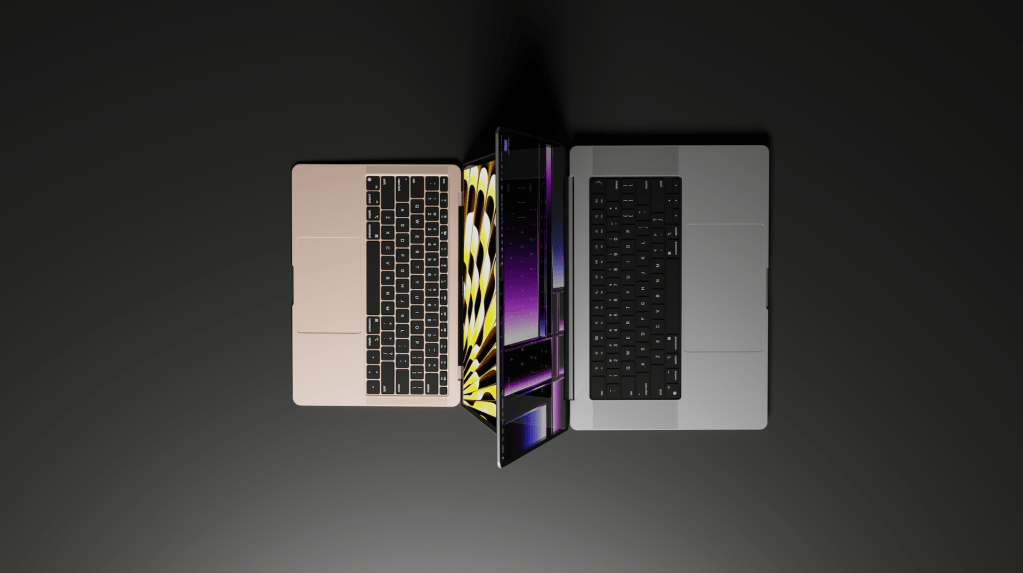
After using a 16″ MacBook Pro and a 13″ MacBook Air every day for three years, here’s my advice for new buyers.
When you purchase through links on our site, we may earn an affiliate commission at no extra cost to you. This helps us continue to create guides like this for our audience.
Introduction – MacBook Air vs. MacBook Pro
If you’re looking to buy a new MacBook but you’re not quite sure if you should go with MacBook Air or MacBook Pro, this guide is for you. I see this question regularly and I totally understand the difficulty with the choice – it’s very hard to compare the different models online when all you see is a long list of specs and some product images that look great, but don’t really give you a good idea of the size and weight of the different models. Besides that, there’s a lot of “hidden” features that are not very obvious when looking at the spec sheets, but have a big impact on the everyday use.
I’m using a 16″ MacBook Pro for work on a daily basis, but I also own a 13″ MacBook Air which I use for all my personal browsing. Technically the MacBook Air belongs to my wife, but I like it so much that I’ve added my own user account on it and we both use it regularly.
The obvious difference between MacBook Air and MacBook Pro, and what this guide will not focus on.
Besides the basics, I’m not going to focus on specs and performance in this guide. That’s an endless rabbit hole and there’s a million tests, benchmarks and comparisons online showing the differences between these two models. One of them is for pro users, one of them is for the casual users. Generally speaking, if you’re doing heavy work that requires a MacBook Pro, you already know it. You don’t need to ask yourself if you should go with a MacBook Air instead. Usually that means professional use where time is money, and every second or minute saved makes a differece.
If you’re not sure whether you need a MacBook Pro, there’s a good chance you’ll be just fine with the Air. I work daily with heavy 4K video files and between my home use and the studios I work at, I constantly change between high-end Mac workstations with a price tag of over $5,000 and my base model MacBook Air I bought for $999. After using the fastest Mac computers money can buy, I’m constantly impressed by how powerful the MacBook Air lineup has been ever since Apple transitioned to Apple Silicon chips. That means, M1, M2, and most recently, M3 chips. For a lot of users, MacBook Air is the perfect laptop. There’s basically nothing that MacBook Pro does that the MacBook Air cannot do. The Pro version might complete some heavy tasks faster, but everything you do on the Pro, you can do on the Air.
If you want to see how much a base-model M1 MacBook Air can handle, check out my stress-test below.
Some things are the same.
Regardless which model you pick, there’s a lot of things that are the same.
- Webcam? It’s all the same between all the different models
- Keyboard? Also the same.
- Trackpad, it’s bigger on the larger models but using it feels the same
- Touch ID, same in all models
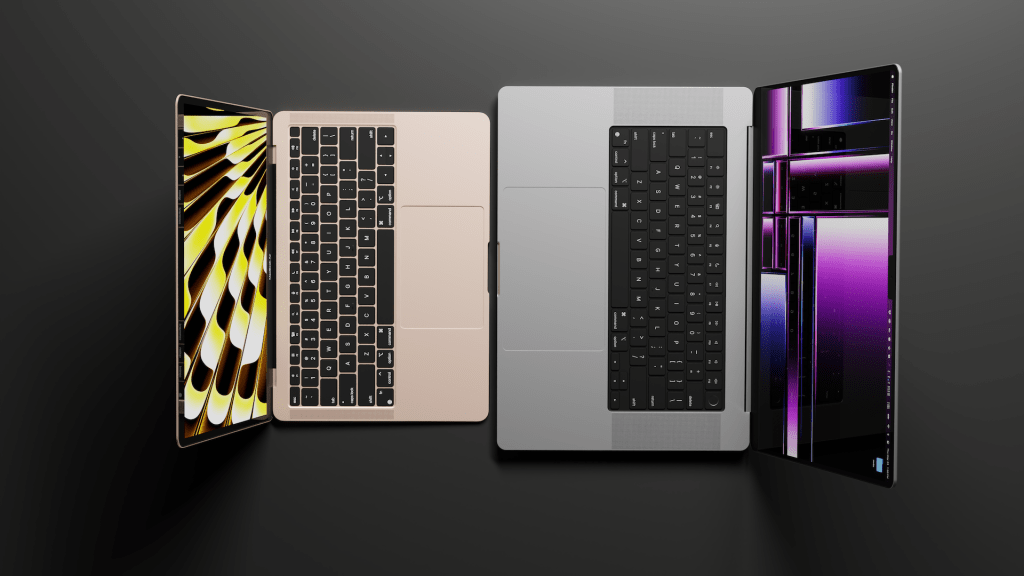
Memory, Storage, Chip options – Obviously different models have different specs, but between MacBook Air and MacBook Pro models, 16GB of memory is 16GB of memory and it performs the same, whether you’re using Air or Pro. Same goes for Storage and Chips, M3 MacBook Air will be just as powerful as M3 MacBook Pro.
So let’s look at all the things that are different.
Size matters. More than you’d think.
When it comes to size and weight, the difference between a 13″ MacBook Air and a 16″ MacBook Pro is MASSIVE. If someone told me that before I had a chance to own both laptops, I would’ve said they’re either crazy or extremely picky. It’s a 3″ difference, it can’t make much of a difference? Turns out it does.
My personal use focuses on 13″ MacBook Air and 16″ MacBook Pro, so a lot of the comparisons I’m doing here are based on those two models. Apple also offers the MacBook Air with a 15″ display, and the MacBook Pro now comes as a 14″ model, so the differences get smaller there.

If you have the option, go to a retail store and look at these computers side-by-side. Comparing them at a store still isn’t the same as actually using them. In a store you’ll maybe get an idea of the physical size, but you won’t know what it feels like to constantly carry it with you, take it in and out of your bag, take it through security at the airport, fit it on your desk etc.
I was going to give you all kinds of numbers and comparisons about the size, but that gets very boring very fast. I’ll just sum it up by saying size matters a lot, and it should be one of the most important things to consider when buying a laptop. The 13″ MacBook Air is amazing because of its size & weight. It’s not much bigger and heavier than an iPad. The screen is just big enough to do just about everything on it, and the extremely slim profile makes it effortless to carry around.
The MacBook Pro is heavy. It’s thick. I had seen it online but the thing that surprised me when I first got my M1 Max MacBook Pro was the thickness and weight. I used to have a 15″ Intel MacBook Pro and it felt significantly lighter than my current 16″ M1 Max model. Don’t get me wrong, I’d choose the M1 Max over the Intel version any day, but the difference in thickness and weight was surprising to me.
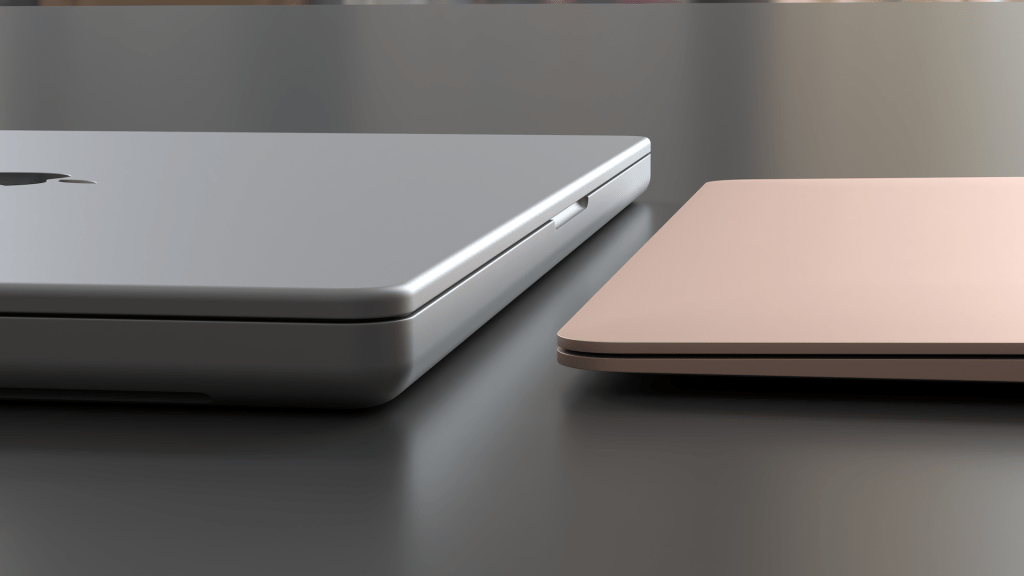
If you want more details on size and weight, I’ll throw some numbers at you below. But the key takeaway is this – the MacBook Air is very slim and lightweight and it’s a joy to carry around. It’s the kind of laptop that I’ll happily pack with me, even if I’m not sure that I’ll need a laptop. Doesn’t take up a lot of space so might as well have it.
The MacBook Pro is still very portable, but you’ll definitely feel it. Picking it up and carrying it in your hand is a bit of a task. When I’m in the office I often walk from one conference room to another while keeping my laptop open so I don’t lose my Wi-Fi connection, and that’s when I really feel the weight. When it’s comfortably tucked in my backpack the weight doesn’t bother me, but anything handheld, whether it’s simply holding it or carrying in a purse or a similar bag, you’re going to feel the weight.
If you want more details, here are some numbers.
- The 16″ MacBook Pro weights 4.7 pounds / 2.14 kg
- The 13″ MacBook Air weights 2.7 pounds / 1.24kg
So one 16″ MacBook Pro weights almost as much as two 13″ MacBook Air models. It’s also amost twice as thick at 0.66″ / 1.68cm compared to the Air, which is 0.44″ / 1.13cm.
Obviously comparing the smallest MacBook Air to the biggest MacBook Pro is unfair. So let’s look at the other available models.
- 15″ MacBook Air – Weights 3.3 pounds / 1.51 kg with the height of 0.45″ / 1.15cm
- 14″ MacBook Pro – Weights 3.5 pounds / 1.61kg with the height of 0.61″ / 1.55cm
So the larger MacBook Air is still lighter and thinner than the smaller MacBook Pro.
Displays – Four sizes to choose from.
The bigger screen in the 16″ model makes it better when doing things that require a larger screen, but at the end of the day it’s still a laptop with a relatively small screen, so any extended pro-use like video editing will require a larger external monitor. The same goes for the 13″ MacBook Air, it’s good for most tasks but if you’re going to do long workdays using it, or need to do a lot of multitasking, investing in a proper external monitor is usually a good idea. But for what it’s worth, I’m writing this blog post on my 13″ MacBook Air and it’s perfect for it. Nice and comfortable when sitting on my couch and the WordPress blog page doesn’t even fill up the whole screen, so I can have another application visible on the side.
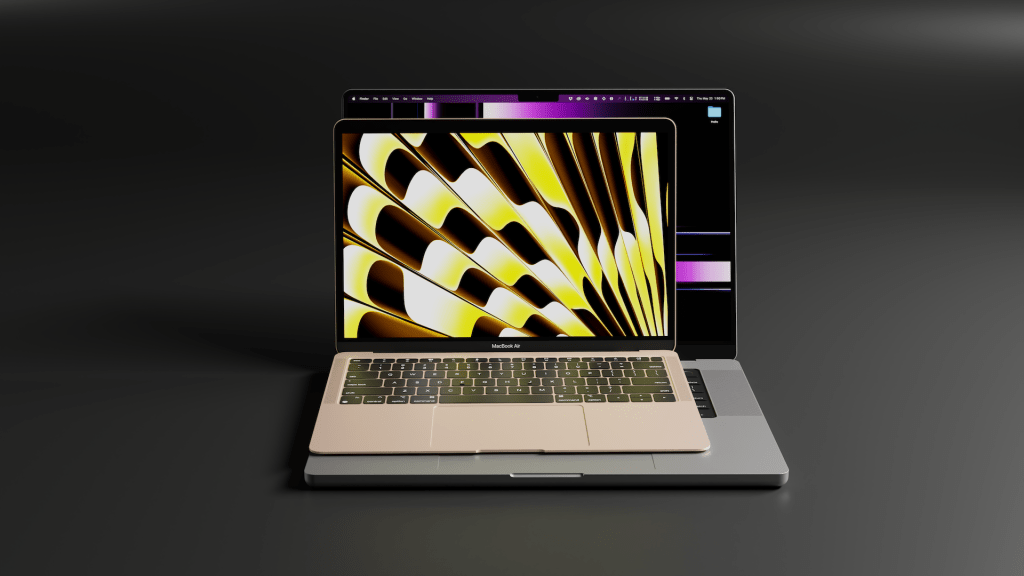
Regardless of the physical display size, both MacBook Pro models have a higher resolution compared to the MacBook Air models. Higher resolution will make the elements on your screen appear smoother and easier on the eyes, but I can’t say I’ve noticed a big difference on my 13″ MacBook Air vs. the 16″ MacBook Pro.
MacBook Pro also gets a higher XDR brightness and ProMotion technology for adaptive refresh rates up to 120Hz. Some people value ProMotion and 120Hz refresh rates a lot and they’ll tell you once you’ve used a display with ProMotion you can’t live without it. I’m the opposite, I can’t really tell the difference and to be honest, I wasn’t even aware that my 16″ MacBook Pro has this feature until I really started to compare the specs between each model.
One of them has an awesome battery. The other one has an insane battery.
Ever since changing from Intel processor to Apple Silicon chips, the MacBook lineup got extremely powerful but also insanely energy-efficient. The battery life on the new MacBooks compared to their old Intel versions must have doubled, and it’s not just marketing talk, it’s real.
The MacBook Air has a great battery life, and the MacBook Pro is even better. Apple lists the 13″ MacBook Air to have up to 18 hours of battery life, while the 16″ MacBook Pro has up to 22 hours. I regularly go to the office with my MacBook Pro and leave the charger home, because I know I can do a full 8-hour workday without needing to charge it at all, even if I do some video editing or long video calls. Sometimes with light use and a lot of idle time I might go a few days before needing to charge it. This is the new norm, but I remember having a similar Intel MacBook Pro in the past and I would need to charge it every 4 hours or so.
The MacBook Air also gets great battery life, but it’s not as impressive as the 16″ MacBook Pro. Which makes sense, considering how much bigger and bulkier the Pro is. I’m sure a lot of that comes from the physical size of the battery.
15″ MacBook Air and 14″ MacBook Pro are both listed with up to 18 hours of battery life, so they should be similar to the 13″ MacBook Air.
Also while we’re talking about battery and power use, the MacBook Airs don’t have fans. So whatever you do on your MacBook Air, it will always be dead silent, and they don’t really get hot either. The MacBook Pro has physical fans and sometimes when I’m rendering a lot of video files I’ll hear a quiet noise coming from the fans, but overall the Pro is also extremely quiet and rarely gets warm. If you’ve had an Intel MacBook Pro in the past that got super hot, you won’t see any of that with the Apple Silicon models.
Ports, let’s not forget about ports
This is a big one. The only reason why I can’t use my MacBook Air as my primary computer is its lack of ports.
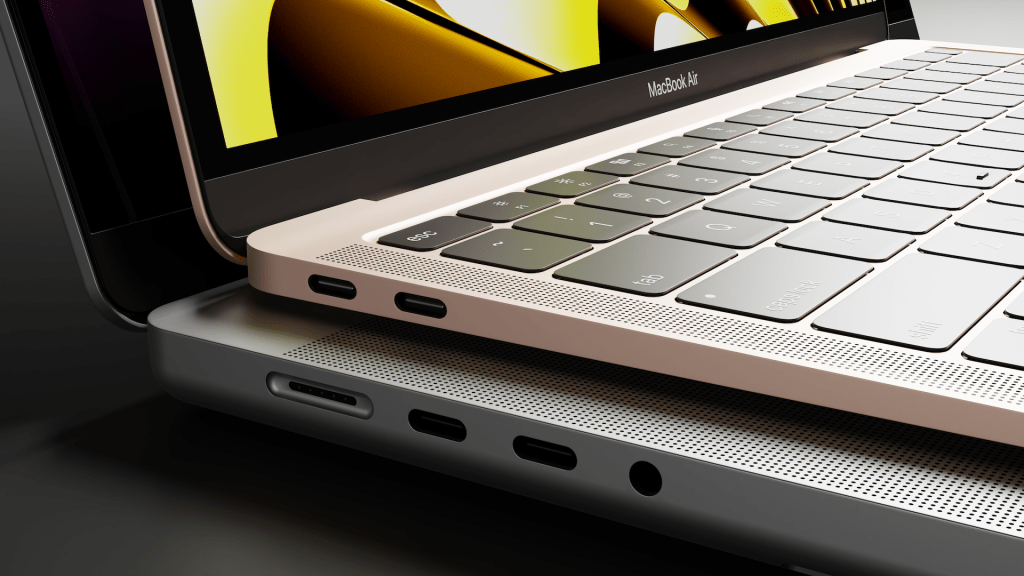
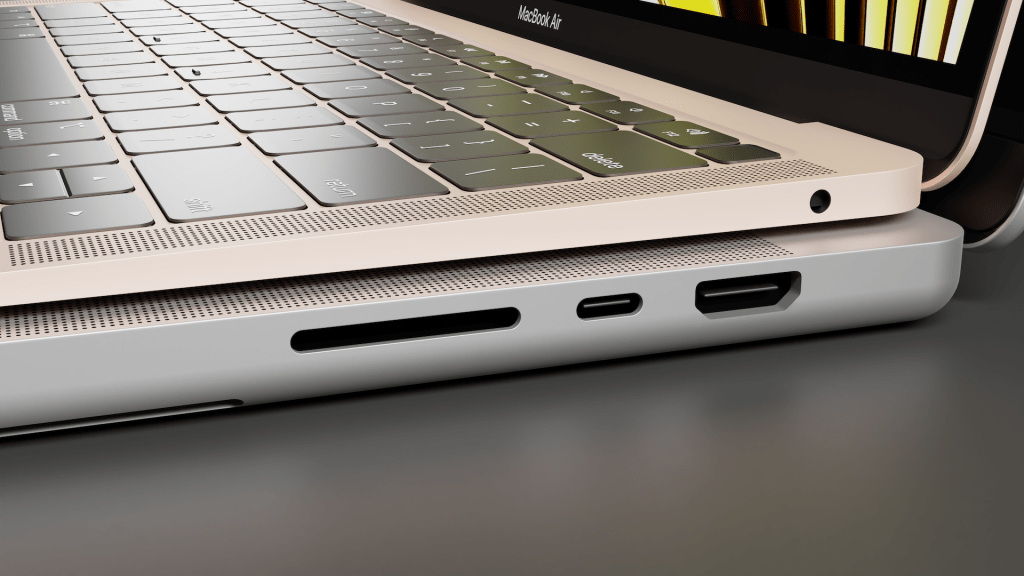
As you see in the picture, the M1 MacBook Air has two Thunderbolt 4 ports and an input for headphones/speakers. That’s it. To make it worse, one of those Thunderbolt 4 ports is used for charging, so if you plug the MacBook Air to a charger and an external monitor, you’ve already used all your available ports.
The M2 and M3 MacBook Airs get a dedicated MagSafe charging port, which is a significant improvement, leaving the two Thunderbolt ports available for other devices. But still, having only two ports can be an issue for some people. I used adapters and dongles for a while, trying to plug in an external monitor, external hard drives, SD cards and other devices, and even though you can kind of make it work with a variety of adapters, it quickly becomes a nightmare. The amount of ports is the same on the 13″ and 15″ MacBook Air.
If you’re the type of user who only needs the laptop and no other devices connected to it, then this doesn’t matter much to you. But for anyone who might be using external monitors, hard drives, card readers, or printers, the choice between MacBook Air and MacBook Pro can make a huge difference. The 16″ MacBook Pro has three Thunderbolt 4 ports, a headphone port, a charging port, an SD card slot, and an HDMI port. The 14″ model is identical except it has two Thunderbolt ports.
Speakers – Who cares about laptop speakers?
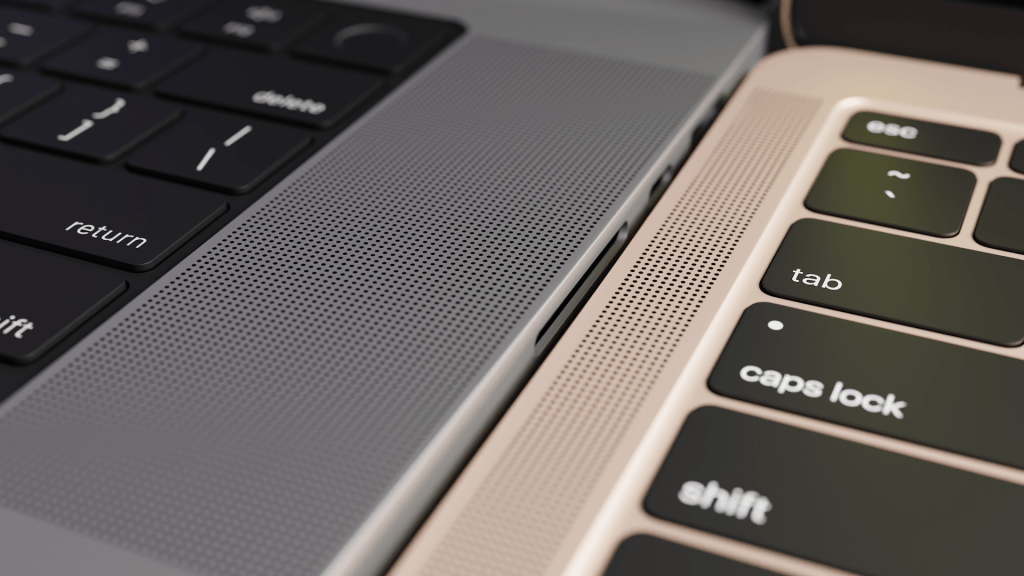
One thing that blew me away was the sound quality of the MacBook Pro speakers. I’m used to the standard laptop speakers where you’ll hear everything, but the sound is flat, kind of like playing music from your phone’s speaker. The speakers in my MacBook Pro actually have some bass and depth to the sound and it sounds shockingly good. Obviously you’ll still get better sound from a dedicated speaker system, but getting high quality audio from my built-in speakers anywhere I am with my laptop has been the kind of joy I did not expect to experience.
14″ and 16″ MacBook Pro share the same speakers so you’ll get the same experience with both models. M1 MacBook Air speakers are nothing special, so those sound like your standard laptop speakers. M2 and M3 models have improved compared to M1, but I haven’t personally had a chance to test those yet. Just looking at specs, they’re better than the M1, but can’t compete with the MacBook Pro models.
Price, where to buy and how to save some money
Naturally, this is important for every buyer. And the price difference between a MacBook Air and a MacBook Pro can be pretty massive, depending on the model you choose.
- 13″ MacBook Air will cost you $999 for the M2 model, and $1,099 for the M3 model
- 15″ MacBook Air starts at $1,299
- 14″ MacBook Pro starts at $1,599
- 16″ MacBook Pro starts at $2,499
Ordering directly from Apple is always a good way to get your Mac, but I’m a big fan of checking the prices on Amazon first. Apple never does discounts or temporary promotions, while Amazon might often have a decent discount on certain products.
To give you an example, at the moment of writing this article the 16″ MacBook Pro ordered through Apple.com costs $2,499, while the official Apple Store on Amazon sells the same model for $2,299 – giving you a $200 discount. Prices on Amazon tend to fluctuate over time, so check the links below for current offers and discounts.
13″ M3 MacBook Air – Check Price on Amazon
15″ M3 MacBook Air – Check Price on Amazon
14″ M3 MacBook Pro – Check Price on Amazon
16″ M3 MacBook Pro – Check Price on Amazon
Summary
So which model should you choose? That depends what’s important to you.
If you’re using the laptop for work and need maximum efficiency, it’s often worth the extra money to invest in a MacBook Pro. If you’re a casual user, 99% of the time you’re going to be happy with a MacBook Air. Even if you do some intense work like photo and video editing on your laptop, there are many students and hobbyists who are getting some serious work done on their MacBook Airs. So just because you edit videos for YouTube doesn’t necessarily mean that you have to invest in a MacBook Pro. Even the base-model MacBook Air can handle more than most people think, as we saw in the stress-test video.
Here’s some questions to ask yourself when making a decision.
- Working with a lot of CPU & GPU intense tasks? MacBook Pro.
- Need a lot of external devices? MacBook Pro.
- Care about speakers and audio quality? MacBook Pro.
- Need amazing battery life? You’ll be happy with either model.
- Carry your laptop a lot and want it to be more portable? MacBook Air.
- Keeping your budget around $1,000? MacBook Air.
- Want a quiet laptop with no fans? MacBook Air.
 Quick Tutorials
Leave a comment