iOS makes it easy to hide all those sensitive photos
How do you hide photos on an iPhone? Luckily, iOS has a handy built-in feature allowing you to hide any photos or videos. With this, photos are removed from your main camera roll and placed inside a hidden folder on your iPhone, which is only accessible with a passcode or Face ID authentication.
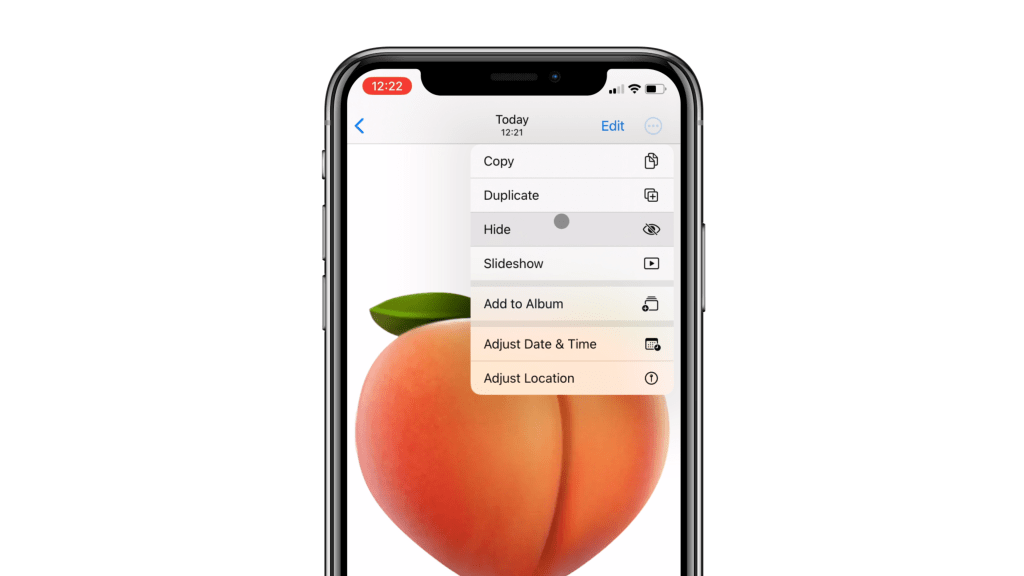
How to hide photos and videos in iOS
Maybe you’re working on a prototype and need to take photos that no one else can see. Or maybe you’re in a long-distance relationship and want to send some photos to your partner, but don’t want those photos in your camera roll with everything else. Here’s an easy solution for that.
Open your Photos app, find a photo or video you want to hide and tap the three dots on the top right of your screen. Tap “Hide”, and the photo will be removed your camera roll and placed in a hidden folder. To view this hidden folder navigate to your Album view, scroll all the way to the bottom and choose “Hidden”. You’ll be prompted with Face ID or passcode, and once you authenticate with that you’ll be able to see your hidden files.
Our favorite setup:
- Apple Magic Keyboard: https://amzn.to/486dCA0
- Apple Magic Mouse: https://amzn.to/3Um4CDy
- Laptop – MacBook Pro M3 Pro: https://amzn.to/43Bj7WG
- Desktop – Mac Mini M2 Pro: https://amzn.to/3TB1ul9
- Monitor – Apple Studio Display: https://amzn.to/49lAxrj
- 2TB SSD Hard drive: https://amzn.to/49trq86
When you purchase through links on our site, we may earn an affiliate commission at no extra cost to you. This helps us continue to create guides like this for our audience.
 Quick Tutorials
Leave a comment